A repeatable release workflow
Bring mobile security testing into delivery instead of restarting an investigation from scratch each time.

01 / APPSEC, MOBILE & API TEAMS
Put an AI pentester to work on your Android app, iOS app, and the APIs they use. Djini operates the app, investigates the business logic, and tests whether connected weaknesses can actually be exploited.
You ask Djini
“Test the new mobile release. Sign in with these test accounts, follow the payment journey, and investigate whether a user can cross an account boundary.”
What your team gets
An investigation your developers can replay, with the affected app and API behavior, reproduction steps, and evidence for a fix.
Access & scope
Mobile testing available today. Agree the backend API scope for your evaluation.
THE WORK BEHIND THE OUTCOME
Mobile releases change screens, sessions, requests, and native components together. A useful pentest follows that whole journey. Djini combines app interaction with deeper analysis, then uses a device to check the attack path.
Provide the app, test accounts, and the journeys that matter. Choose a virtual device or supported physical handset for the run.
Agents read screens, navigate the app, and exercise real user flows. They follow the mobile behavior into the API interactions and trust decisions behind it.
Investigate business-logic flaws and native code when relevant. Combine related weaknesses and test the resulting path on the device.
Give developers the reproduction and impact. Run the relevant journey after the patch and bring the same testing workflow into your pipeline.
INSIDE DJINI
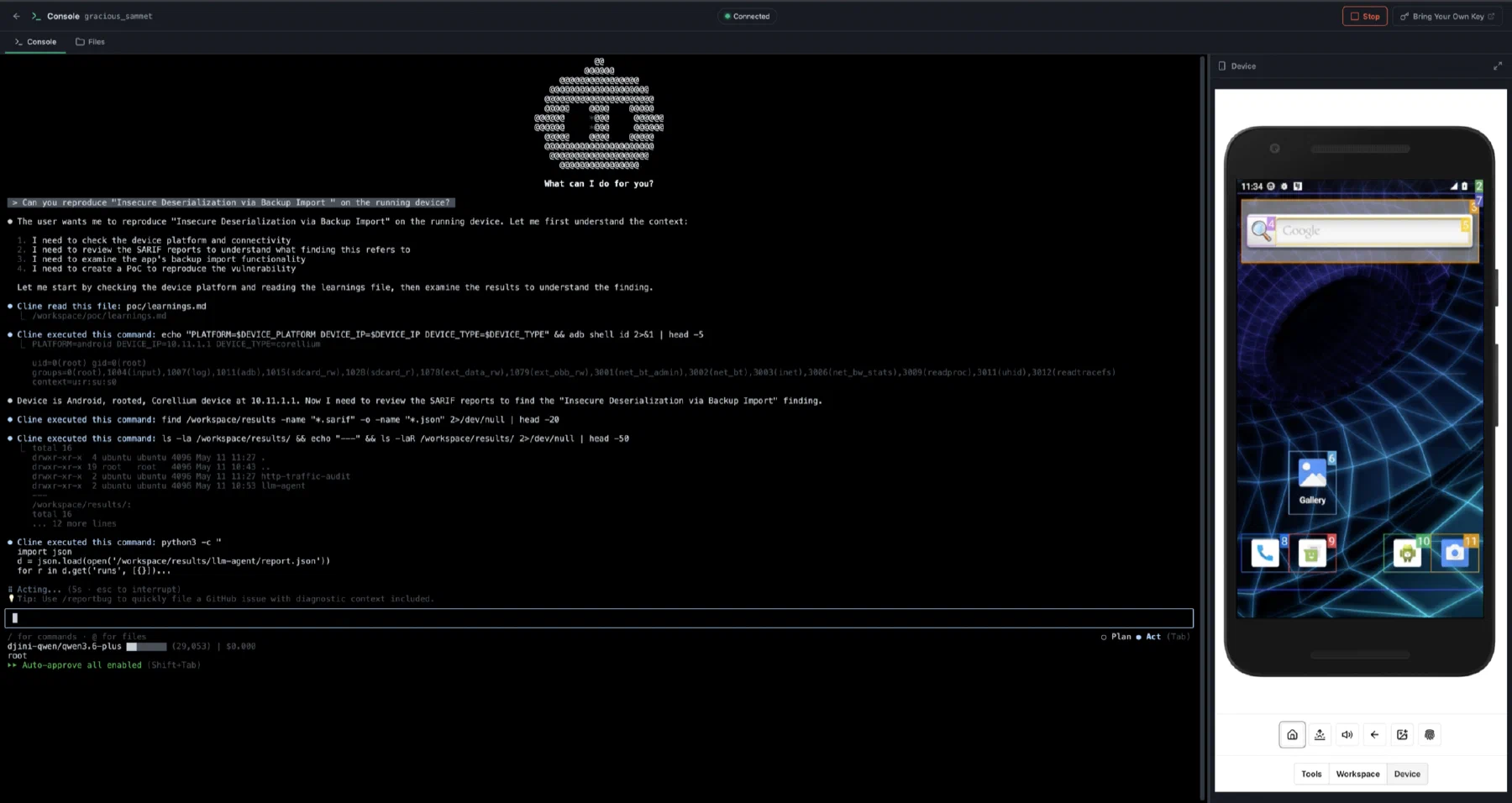
The Djini console puts the agent conversation, command execution, and running phone in the same view. Follow the test from the first interaction through to the evidence.
WHAT YOUR TEAM TAKES AWAY
Bring mobile security testing into delivery instead of restarting an investigation from scratch each time.
Use the observed app and API behavior to explain what an attacker could achieve.
Keep the reproduction path so the team can check the change against the original behavior.
A few good questions
The workflow starts with Android or iOS and follows the backend interactions used by the app. Broader standalone API, web, cloud, and red-team coverage should be scoped with Djini for your deployment.
Yes. Djini provides API access for pipeline-triggered scans. Decide which builds, environments, and test accounts belong in each run, and size the workflow to your subscription and device capacity.
Yes. Start with the app for blackbox analysis and runtime testing. Add AI SAST when you have source and want code-level review before a build.
PUT DJINI TO WORK
New accounts include one blackbox AI SAST + dynamic welcome scan.
THIS WORKFLOW, IN YOUR INDUSTRY